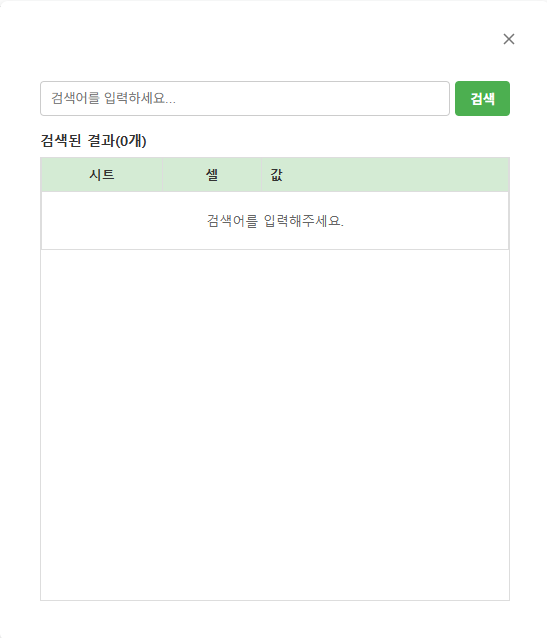
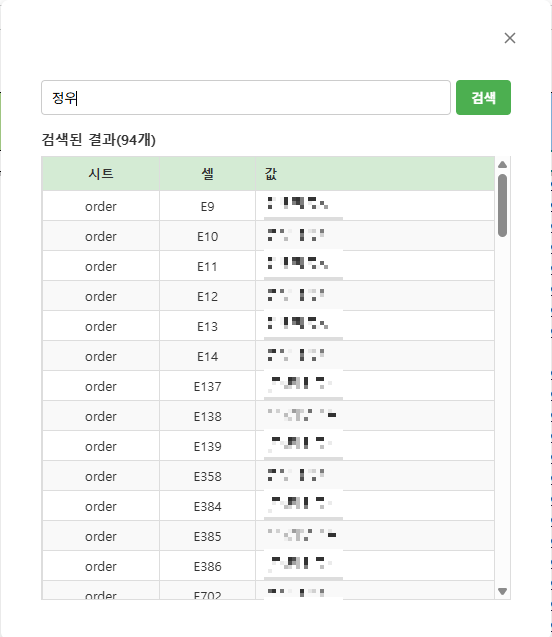
Sharepoint에는 있지만, 구글 스프레드시트에는 없는 "모두 찾기" 기능을 Apps script를 이용해서 구현하였다.
기존에 Ctrl+F나, Ctrl+H창에서도 검색이 가능하지만, 한개한개 확인을 하여야하고 한눈에 보기 어렵기에 공유한다.
search_gs.gs
|
function onOpen() {
SpreadsheetApp.getUi().createMenu('🔍 맞춤 도구')
.addItem('모두 찾기', 'showSearchDialog')
.addToUi();
}
function showSearchDialog() {
const html = HtmlService.createHtmlOutputFromFile('search_html')
.setWidth(500)
.setHeight(550)
.setTitle('찾기');
SpreadsheetApp.getUi().showModelessDialog(html, ' ');
}
/**
* [속도 최적화 버전]
* 1. getDataRange()로 실제 데이터가 있는 영역만 타겟팅
* 2. getDisplayValues()로 화면에 보이는 문자열 그대로 가져옴 (String 변환 비용 절감)
* 3. 반복문 내부 변수 접근 최소화
*/
function findAll(keyword) {
if (!keyword) return [];
const ss = SpreadsheetApp.getActiveSpreadsheet();
const sheet = ss.getActiveSheet();
// [최적화 1] getLastRow/Col 대신 getDataRange 사용
// 전체 시트가 아닌 '실제 데이터가 있는 영역'만 정확히 가져와서 빈 공간 탐색을 줄임
const range = sheet.getDataRange();
// [최적화 2] getValues 대신 getDisplayValues 사용
// 날짜, 숫자 등을 별도 String() 변환 없이 화면에 보이는 텍스트 그대로 고속 로드
const values = range.getDisplayValues();
const sheetName = sheet.getName();
const regex = new RegExp(keyword, 'i');
let results = [];
// 행/열 길이 미리 캐싱 (루프 내 접근 방지)
const numRows = values.length;
if (numRows === 0) return [];
const numCols = values[0].length;
// [최적화 3] 루프 최적화
for (let r = 0; r < numRows; r++) {
const row = values[r]; // 행 데이터를 변수에 할당하여 배열 인덱싱 비용 절감
for (let c = 0; c < numCols; c++) {
const val = row[c];
// 빈 값은 빠르게 스킵 (Short-circuit evaluation)
if (val && regex.test(val)) {
// columnToLetter 함수 호출 대신, 필요할 때만 계산
results.push({
sheet: sheetName,
cell: convertToA1(c, r), // 아래 최적화된 함수 사용
value: val.substring(0, 100)
});
}
}
}
return results;
}
/**
* [최적화] 좌표 -> A1 표기법 변환 (가벼운 수학 연산)
* r, c는 0부터 시작하는 인덱스 기준
*/
function convertToA1(colIndex, rowIndex) {
let temp, letter = "";
let column = colIndex + 1;
while (column > 0) {
temp = (column - 1) % 26;
letter = String.fromCharCode(temp + 65) + letter;
column = (column - temp - 1) / 26;
}
return letter + (rowIndex + 1);
}
function selectCell(sheetName, cellAddress) {
const ss = SpreadsheetApp.getActiveSpreadsheet();
const sheet = ss.getSheetByName(sheetName);
if (sheet) {
sheet.activate();
sheet.getRange(cellAddress).activate();
}
}
|
search_html.html
|
<!DOCTYPE html>
<html>
<head>
<base target="_top">
<style>
/* 전체 레이아웃 & 폰트 */
body {
font-family: 'Malgun Gothic', '맑은 고딕', sans-serif;
padding: 15px;
margin: 0;
background-color: #fff;
font-size: 13px;
color: #333;
display: flex;
flex-direction: column;
height: 100vh; /* 전체 높이 사용 */
box-sizing: border-box;
}
/* 1. 검색창 영역 */
.search-box {
display: flex;
gap: 5px;
margin-bottom: 15px;
flex-shrink: 0; /* 높이 고정 */
}
input {
flex: 1;
padding: 8px 10px;
border: 1px solid #ccc;
border-radius: 4px;
outline: none;
}
button {
padding: 8px 15px;
background-color: #4CAF50; /* 버튼도 초록 계열로 맞춤 */
color: white;
border: none;
border-radius: 4px;
cursor: pointer;
font-weight: bold;
}
button:hover { background-color: #45a049; }
button:disabled { background-color: #ccc; cursor: default; }
/* 2. 결과 카운트 제목 (예: 검색된 결과(66개)) */
.result-title {
font-weight: bold;
font-size: 14px;
margin-bottom: 8px;
color: #333;
flex-shrink: 0;
}
/* 3. 테이블 영역 (스크롤 처리) */
.table-container {
flex: 1; /* 남은 공간 모두 차지 */
overflow-y: auto; /* 세로 스크롤 */
border: 1px solid #ddd;
border-top: none; /* 헤더랑 겹침 방지 */
}
table {
width: 100%;
border-collapse: collapse;
table-layout: fixed; /* 컬럼 너비 고정 */
}
/* 테이블 헤더 (초록색 배경) */
th {
background-color: #d4ebd4; /* 이미지와 유사한 연한 초록색 */
color: #333;
padding: 8px;
font-weight: bold;
text-align: center;
border: 1px solid #ddd;
position: sticky; /* 스크롤 시 헤더 고정 */
top: 0;
z-index: 1;
}
/* 테이블 데이터 셀 */
td {
padding: 6px 8px;
border: 1px solid #ddd; /* 격자무늬 테두리 */
white-space: nowrap; /* 줄바꿈 방지 */
overflow: hidden; /* 넘치는 텍스트 숨김 */
text-overflow: ellipsis; /* ... 처리 */
cursor: pointer;
}
/* 행(Row) 스타일 */
tr:nth-child(even) { background-color: #f9f9f9; } /* 짝수 행 연한 회색 */
tr:hover { background-color: #e8f5e9; } /* 마우스 올리면 진한 초록색 하이라이트 */
/* 컬럼 너비 조정 */
.col-sheet { width: 25%; text-align: center; }
.col-cell { width: 20%; text-align: center; }
.col-value { width: 55%; text-align: left; }
/* 로딩/메시지 상태 */
.status-msg {
text-align: center;
padding: 20px;
color: #666;
background: #fff;
}
</style>
</head>
<body>
<div class="search-box">
<input type="text" id="keyword" placeholder="검색어를 입력하세요..." onkeyup="if(window.event.keyCode==13){runSearch()}">
<button id="searchBtn" onclick="runSearch()">검색</button>
</div>
<div id="result-count" class="result-title">검색된 결과(0개)</div>
<div class="table-container">
<table>
<thead>
<tr>
<th class="col-sheet">시트</th>
<th class="col-cell">셀</th>
<th class="col-value">값</th>
</tr>
</thead>
<tbody id="result-body">
<tr><td colspan="3" class="status-msg">검색어를 입력해주세요.</td></tr>
</tbody>
</table>
</div>
<script>
function runSearch() {
const keyword = document.getElementById('keyword').value.trim();
if (!keyword) return;
const tbody = document.getElementById('result-body');
const countDiv = document.getElementById('result-count');
const btn = document.getElementById('searchBtn');
// 로딩 표시
tbody.innerHTML = '<tr><td colspan="3" class="status-msg">⏳ 검색 중...</td></tr>';
countDiv.innerText = '검색 중...';
btn.disabled = true;
google.script.run
.withSuccessHandler(showResults)
.withFailureHandler(showError)
.findAll(keyword);
}
function showResults(data) {
const tbody = document.getElementById('result-body');
const countDiv = document.getElementById('result-count');
const btn = document.getElementById('searchBtn');
btn.disabled = false;
// 결과 개수 업데이트
countDiv.innerText = `검색된 결과(${data.length}개)`;
if (data.length === 0) {
tbody.innerHTML = '<tr><td colspan="3" class="status-msg">검색 결과가 없습니다.</td></tr>';
return;
}
// [최적화] 테이블 행(Row) 생성
let htmlRows = [];
for (let i = 0; i < data.length; i++) {
const item = data[i];
// 클릭 시 이동 함수 연결
htmlRows.push(`
<tr onclick="moveTo('${item.sheet}', '${item.cell}')" title="${escapeHtml(item.value)}">
<td class="col-sheet">${item.sheet}</td>
<td class="col-cell">${item.cell}</td>
<td class="col-value">${escapeHtml(item.value)}</td>
</tr>
`);
}
tbody.innerHTML = htmlRows.join('');
}
function moveTo(sheet, cell) {
google.script.run.selectCell(sheet, cell);
}
function showError(err) {
const tbody = document.getElementById('result-body');
tbody.innerHTML = `<tr><td colspan="3" class="status-msg" style="color:red">오류: ${err}</td></tr>`;
document.getElementById('searchBtn').disabled = false;
}
function escapeHtml(text) {
if (!text) return "";
return text
.replace(/&/g, "&")
.replace(/</g, "<")
.replace(/>/g, ">")
.replace(/"/g, """)
.replace(/'/g, "'");
}
</script>
</body>
</html>
|
'Google Sheet' 카테고리의 다른 글
| [스프레드시트] python으로 구글 시트영역 pdf, png 이미지로 변환하기 (0) | 2026.01.22 |
|---|---|
| [스프레드시트] 도형, 그림 복사하기 (0) | 2026.01.19 |
